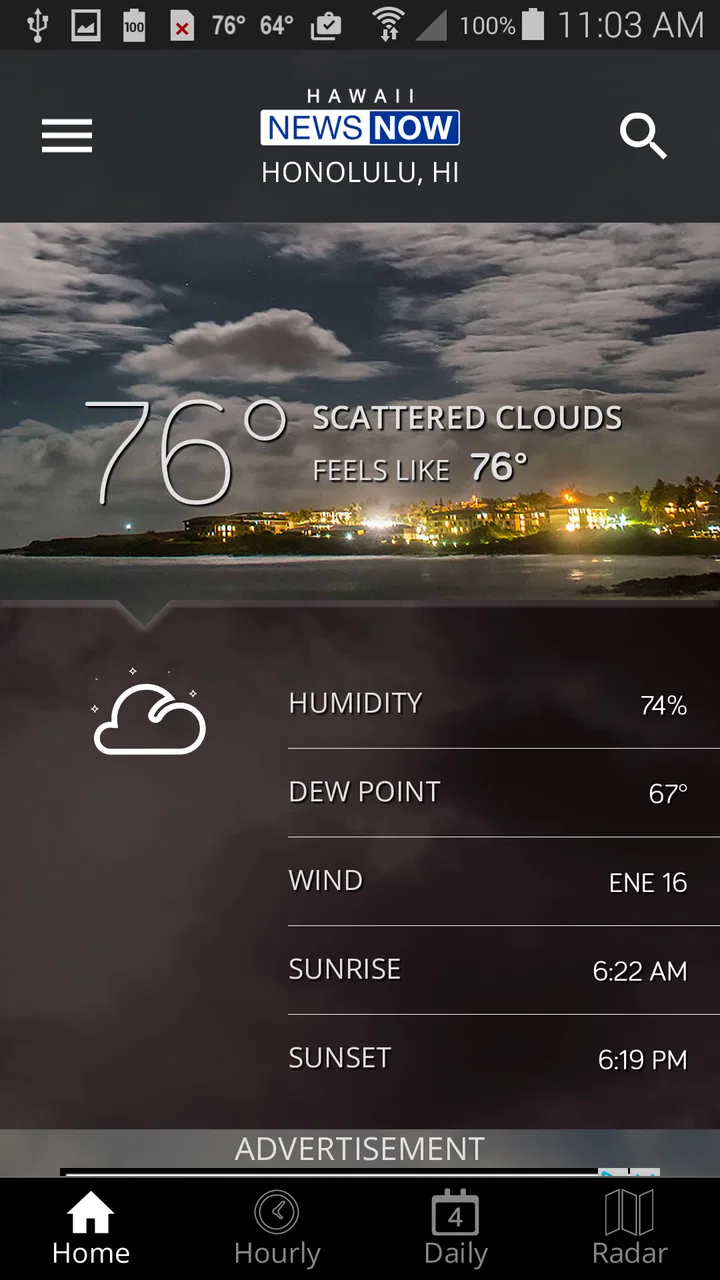
Hawaii News Now Weather
- 4.7
- Rating
- 100.00K
- Installs
- Free
- Price

 Analysis by App-foxy
I installed Hawaii News Now Weather to see whether it works as a practical daily weather companion rather than simply another forecast icon on a phone. It is a free weather app from Gray Media, connected to the Hawaii News Now brand, and its main appeal is easy to understand: people in Hawaii often need weather information that feels relevant to local conditions, not a generic forecast built for a distant mainland city.
My overall impression is positive, especially for someone who already follows Hawaii News Now and wants weather information in the same local-news environment. The app has a 4.7 average from around 1.2 thousand ratings, with more than 100 thousand installs, so it has attracted a meaningful audience without feeling like an obscure experiment. Still, I would not treat it as a universal replacement for every weather tool. Its value depends heavily on how much you care about Hawaii-focused coverage, how quickly you need detailed forecasting, and how comfortable you are evaluating an app’s controls for yourself.
What makes this Hawaii-focused weather app useful
The first thing I noticed is that the app’s identity is more specific than a standard weather utility. It is not presented as a worldwide forecasting platform with a Hawaii option buried among thousands of locations. It comes from Gray Media and is built around Hawaii News Now, which gives it a clear regional purpose. That focus matters when my question is not merely “Will it rain?” but “What should I expect before I leave home, drive across town, or plan time outdoors?”
You May Also Like

 Blood Strike: 2.5 Anniversary
Blood Strike’s Loadouts Turn Every Drop Into a Tactical Gamble
A close look at Blood Strike’s custom loadouts: how fast access to signature weapons reshapes its battle royale rhythm, rewards preparation, and narrows the gap between fights.

 Pandora - Music & Podcasts
Pandora’s Music Is Easy to Start, but Harder to Recover
Pandora’s strength is its low-effort path from a seed to a station. Its weak spot is how much confidence it asks you to place in connection, setup, and quiet recovery.

 8 Ball Pool
 Is Built on Rivalries, Rematches, and Routine
A close look at the rivalries, rematches, shared routines, and unanswered safety questions that turn a quick pool match into a persistent mobile community.

 Samsung Music
’s Quiet Strength Is Playing What You Already Own
Its reach comes less from spectacle than from dependable access to a personal library. That simplicity is both the app’s strongest retention engine and its ceiling.

 AccuWeather: Weather Radar
AccuWeather Review: A Quick, Clear Forecast for Everyday Decisions
For everyday plans, the best forecast is the one you can understand quickly. AccuWeather makes rain timing, radar, and local conditions easy to act on, with a few trade-offs.

 Hill Climb Racing
Why Hill Climb Racing Still Turns Crashes Into One More Run
A tiny car, a bumpy hill and one more upgrade: Hill Climb Racing keeps resurfacing because its simple chaos makes every near-miss feel personal.
More From Our News Desk



For a resident, visitor, or anyone keeping an eye on conditions across the islands, a locally oriented app can be easier to trust emotionally because the information feels connected to the place. That does not automatically make every forecast more accurate, and I would not confuse local branding with a guarantee. However, the regional focus gives the experience a more useful starting point than an entirely generic weather screen.
In everyday use, I would open it before commuting, checking whether an outdoor appointment still makes sense, or deciding whether to carry rain protection. Hawaii’s weather can change noticeably over short distances, so a forecast is most useful when I treat it as a planning aid rather than a promise. The app is at its best when I use it for that kind of repeated, practical check.
The store describes it as a full-featured weather app, but I prefer judging it by the habits it supports. A weather app earns its place when I can check it quickly, understand what I am seeing, and make a decision without digging through clutter. That is the standard I used here. The regional connection is the strongest reason to try it; the main question is whether its actual presentation fits the way you personally monitor weather.
A realistic morning routine
Imagine a weekday morning when I need to leave for work, pick up a child, and spend part of the afternoon outside. I would use the app in two stages. First, I would check the immediate conditions before leaving, looking for anything that changes the timing or clothing decision. Later, I would revisit the forecast before the outdoor activity instead of assuming that the morning view still applies.
That second check is an important habit in Hawaii. A single glance at breakfast should not be treated as a complete plan for the whole day. The app is more valuable when it becomes part of a simple routine: check before departure, check before an exposed activity, and use local awareness to interpret what the screen is showing. This is a more realistic use than opening it once and expecting certainty.
For travelers, I see a similar benefit. Someone staying in one area may want a quick local reference before choosing between a beach visit, a hike, or an indoor plan. I would still compare conditions with official alerts during serious weather and avoid making safety-critical decisions from one app alone. For casual planning, though, the Hawaii News Now connection makes this a sensible app to keep available.
Trust starts with what the app clearly lets me control
The editorial question I apply to any weather app is not simply whether it looks polished. I also want to know what choices are visible when I use it. Weather tools often become part of a daily routine, which means location access, notifications, and other settings deserve attention. I do not want to grant more access than the app needs for the way I intend to use it.
With this app, I recommend reviewing the permission prompts and device settings during setup rather than tapping through them automatically. If I only want to check a selected location manually, I should consider whether continuous location access is necessary for my use. If I want location-based convenience, I should understand what the operating system offers and choose the least extensive option that still does what I need.
This is not a criticism unique to Hawaii News Now Weather. It is a sensible rule for any weather application. The important point is that the user should remain involved in the decision. A forecast app can be useful without becoming an invisible background service in my routine, and I prefer to decide that balance myself.
I also pay attention to notification controls. Weather alerts can be helpful when conditions are changing, but too many notifications quickly turn a useful tool into noise. I would begin conservatively, keep only the alerts that support a real need, and adjust them after a few days. Someone who checks the app manually may prefer fewer interruptions, while a person who spends long periods outdoors may value timely warnings more.
The most trustworthy setup is the one I understand and can change later. That means checking the app’s permission choices, notification settings, and the relevant controls in the phone’s operating system. I would not assume that a weather app needs every available permission, and I would not assume that disabling one convenience feature makes the entire app unusable. Testing the app with a limited setup is the practical way to find the right balance.
Handling location and privacy-sensitive moments
Location is the most obvious sensitive issue for a weather app. If I am asking for conditions around my current position, location can make the experience faster. But there are moments when I would rather avoid sharing a changing location, such as when I am traveling, using a work phone, or checking weather for a place I already know by name.
In those situations, I would use a manually selected place if the app’s available controls support that workflow, and I would review the phone’s location permission rather than leave it at its broadest setting by habit. This approach also helps me separate convenience from necessity. I may want a local forecast, but I do not always need the app to identify where I am automatically.
Another sensitive moment is severe weather. When conditions become dangerous, I become less interested in convenience and more interested in clarity, timing, and confirmation. I would use the app as one source, then check official emergency information or local authorities for instructions. The app can help me notice that conditions deserve attention, but it should not be my only source for evacuation decisions, road closures, or other high-consequence actions.
Privacy awareness also matters when I am using a shared device. If another family member relies on the phone, I would make sure the selected location and notification behavior match the household’s needs. A weather app that quietly presents the wrong place can lead to poor decisions, especially when someone assumes the screen is showing current local conditions.
I avoid making claims about invisible data practices based only on the app’s category or branding. Instead, I look at the choices presented during use and the controls available through the device. That is the fairest way to evaluate trust here: observe what I can manage, read the relevant disclosures when shown, and avoid granting access automatically.
How it compares with familiar weather alternatives
The usual alternative is the weather service already built into the phone. That option is convenient, familiar, and often good enough for a quick temperature check. If I only need a basic glance and do not care about Hawaii News Now’s regional identity, the built-in tool may be the better choice because it requires no extra habit.
A general-purpose weather app can be stronger for people who compare many locations, study long-range trends, or want a highly customizable dashboard. Those apps often make sense for travelers moving between regions or users who enjoy detailed weather data. I would choose one of them over this app if my daily routine involved several countries, complex comparisons, or specialized forecasting needs.
Hawaii News Now Weather makes more sense when the local connection is the deciding factor. It is a focused choice for someone who wants a Hawaii-oriented weather source and already values the Hawaii News Now ecosystem. The trade-off is that a regional app may feel less compelling to someone who rarely checks Hawaii conditions or expects the broadest possible set of tools in one place.
I also would not choose it solely because of its rating. A 4.7 average is encouraging, but ratings cannot tell me whether the interface suits my habits, whether notifications are too frequent for my taste, or whether the app covers the locations I personally need. I treat the rating as a reason to investigate, not as proof that it is the right fit for everyone.
Version, access, and practical expectations
The current version is 6.2.512, and the app supports devices running at least iOS 9. It is free, with an Everyone content rating, so the basic barrier to trying it is low. I appreciate that I can test it without committing money, but “free” does not remove the need to review permissions, notifications, and any choices presented during setup.
The app has been available since December 20, 2011, which gives it a long history compared with a newly launched weather tool. Longevity can be reassuring because it suggests the product has had time to evolve, but it is not a substitute for evaluating the current experience. Older apps can also carry design decisions that feel less modern, so I would judge the present version on speed, readability, and ease of navigation rather than on age alone.
Before relying on it during a trip, I would install it while I still have time to explore. I would confirm that the location I care about is represented correctly, inspect the notification behavior, and make sure the text and forecast layout are comfortable to read. This small test prevents a common mistake: waiting until the moment of need to discover that the app is configured for the wrong place or is too distracting.
Battery impact is another practical consideration I handle through settings rather than assumptions. If I use manual checks, I can keep the experience simple. If I enable more automatic behavior, I would watch how it affects my phone over a normal day and reduce anything I do not actually use. This is a better approach than accepting every convenience feature and only investigating after the phone becomes annoying.
Who should use it, and who should skip it
I would recommend trying Hawaii News Now Weather if you live in Hawaii, visit regularly, or prefer a weather source with a clear local-news identity. It is also a reasonable choice for people who want a free app for routine checks and are willing to spend a few minutes configuring location and notifications carefully.
I would be more cautious about recommending it to someone who wants a worldwide weather dashboard, highly specialized meteorological tools, or extensive customization. A dedicated general weather platform may be a better match in those cases. Likewise, if you dislike installing separate apps for services already available through your phone, the built-in weather option may be sufficient.
I would also skip making it my only source during dangerous conditions. That is not because the app is uniquely unsuitable; it is because serious weather decisions deserve confirmation from official emergency channels. A convenient forecast screen is useful for awareness, but it should not replace instructions from authorities when safety is involved.
My cautious verdict after using it
Hawaii News Now Weather is a focused, free weather app with a strong reason to exist: it gives Hawaii News Now users a dedicated way to check local weather as part of their everyday routine. I like the regional purpose more than I like the idea of downloading another generic forecast tool, and the app’s established presence and 4.7 average make it worth testing.
My recommendation comes with a clear condition. I would install it, review the visible permission and notification choices, start with a restrained setup, and use it for ordinary planning before depending on it heavily. I would manually verify the selected location, avoid unnecessary access, and keep official sources available for severe conditions.
In the end, this is best for readers who want Hawaii-centered weather awareness without paying for an app. It is not automatically the best option for global travelers, data-heavy weather enthusiasts, or people satisfied with a phone’s built-in forecast. For the right user, though, Hawaii News Now Weather can become a practical daily check—provided I stay in control of how it accesses my device and how much authority I give its forecasts.
FAQs for Hawaii News Now Weather
01What is Hawaii News Now Weather?
Hawaii News Now Weather is a weather-focused app designed for people who want local forecasts and weather updates across the Hawaiian Islands. After exploring the app, its main purpose is to provide current conditions, hourly and extended forecasts, radar information, weather alerts, and other useful details for planning commutes, outdoor activities, travel, and everyday life in Hawaii.
02What weather information does Hawaii News Now Weather provide?
The app typically brings together several types of local weather information in one place, including current temperature, feels-like conditions, wind, humidity, visibility, precipitation chances, hourly forecasts, and multi-day outlooks. Depending on the selected location, users may also find interactive radar, satellite imagery, sunrise and sunset times, and forecast videos or updates from the Hawaii News Now weather team.
03Can I receive severe weather alerts through the app?
Yes, Hawaii News Now Weather is intended to help users stay informed about changing and potentially dangerous conditions, including heavy rain, flooding, strong winds, tropical systems, and other local advisories. Alert availability can depend on your location settings and notification permissions, so you should enable notifications and allow location access if you want timely warnings while traveling or moving between Hawaiian islands.
04Does Hawaii News Now Weather use my location?
The app can use your device’s location to show weather conditions and forecasts for your current area, which is especially useful when traveling around Hawaii. You can usually choose whether to grant location access and may be able to search for or save other locations manually. Review the app’s permission requests and privacy policy before downloading if location sharing is an important concern.
05Is Hawaii News Now Weather free to download and use?
Hawaii News Now Weather is generally offered as a free app, allowing users to access core forecasts, current conditions, radar features, and weather notifications without an upfront purchase. However, the app may contain advertising, links to news content, or optional features that vary by version. Before installing, check the official Google Play Store or Apple App Store listing for current pricing, compatibility, and in-app purchase details.
Pros
- Accurate local forecasts for Hawaii’s islands and communities.
- Live radar helps track rain
- storms
- and changing conditions.
- Severe weather alerts can provide important safety updates.
- Useful tropical storm and hurricane coverage during the season.
- Clean layout makes current conditions easy to check quickly.
Cons
- Some alerts may arrive later than official emergency notifications.
- Forecast details can vary between islands and remote areas.
- Advertising may interrupt the browsing experience.
- The app may use noticeable battery and mobile data for live updates.
- Some features require a reliable internet connection to work properly.

Hawaii News Now Weather
Gallery